Authenticated scanning behind OAuth, MFA, and CAPTCHA

Authenticated vulnerability scanning reaches where your real risk lives, behind the login, and it is the kind of security scanning most tools fail at.
A scanner hits the OAuth redirect, the MFA prompt, or the CAPTCHA, falls back to crawling as an anonymous visitor, and still finishes green, so the report says you are covered while the account APIs, admin flows, and tenant boundaries go untested.
Authenticated apps break naive scanners in a handful of predictable ways, from OAuth redirects and expiring tokens to rotating MFA codes and CAPTCHA. This piece covers why each one trips a scanner, the tool-neutral methodology for holding a real session, and how to prove your scan got behind the login and keep it there on every build.
TL;DR
- A clean scan can be a lie. When a scanner hits OAuth, MFA, or CAPTCHA and quietly falls back to unauthenticated, it finishes green, having tested your login page and nothing behind it. That authenticated surface is where attackers spend their time; credential abuse shows up in 39% of breaches (2026 DBIR).
- Holding the session takes deliberate setup. Replay the full OAuth flow with refresh, seed the TOTP secret, allowlist CAPTCHA in staging, exclude logout, then prove the scan actually reached authenticated endpoints.
- It only counts if it runs on every build. The worst risks (BOLA, broken authentication, BFLA) are only reachable with a live session, and Escape holds that authenticated coverage for the whole run where most scanners break, then re-tests it on every release.
Authenticated vs unauthenticated scanning
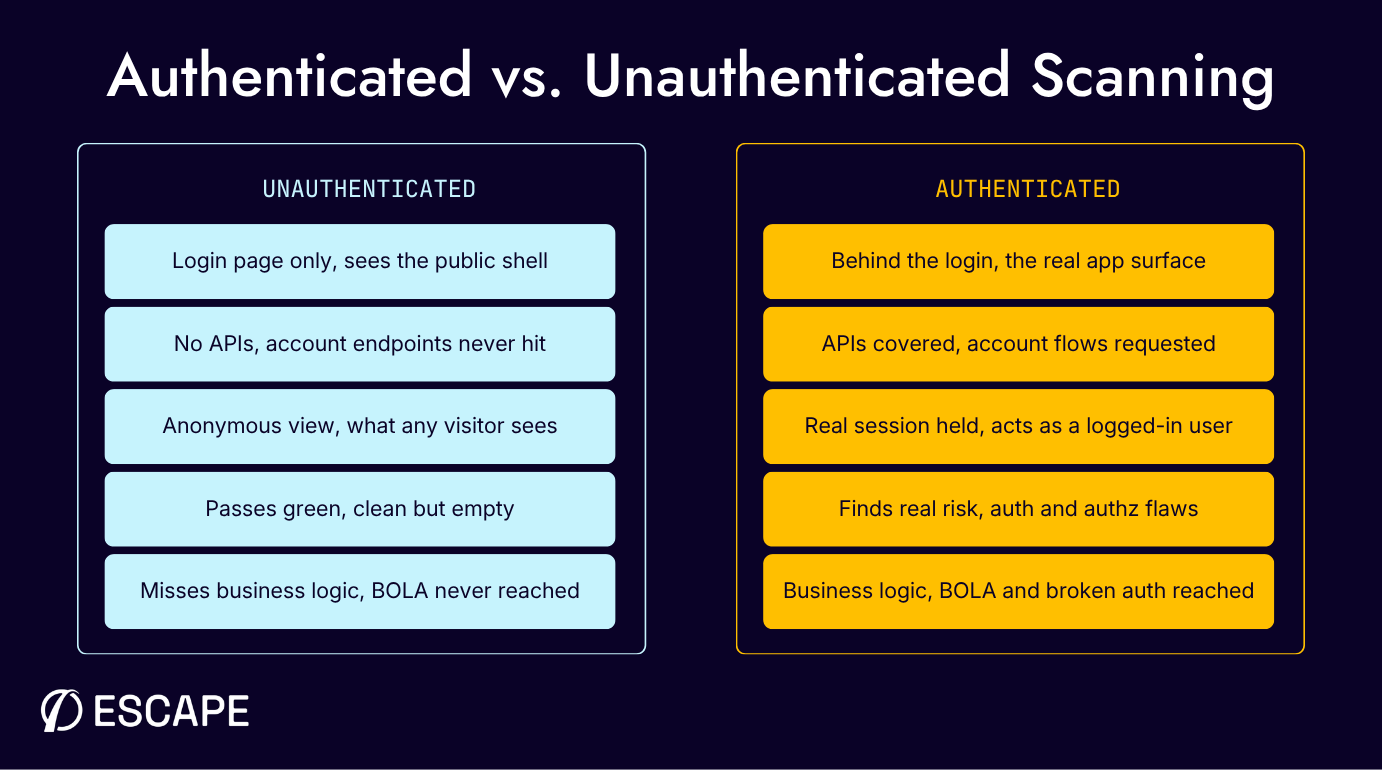
The whole difference between the two scan modes comes down to whether the scanner is holding a real session when it crawls. When it is, the request log fills with account APIs, order flows, and admin routes. When it isn't, you get a thin trail of public pages and no warning that anything is missing.
What are authenticated scans?
Authenticated vulnerability scanning, also called credentialed or gray-box scanning, carries valid credentials and a real session, testing the application the way a logged-in user does, across the account APIs, order flows, admin views, and privileged actions.
An unauthenticated (black-box) scan only sees what an anonymous visitor sees, usually a marketing shell and a login form. Same target, very different attack surface.
The distinction predates OAuth; NIST SP 800-115 separates credentialed scans, which hold valid credentials on the target system and pull vulnerability information directly, from non-credentialed scans, which have no access and infer what they can from the network.
A credentialed scan sees the operating system, installed and outdated software, configuration issues, and missing patches in detail, which is why you want both views.
That guidance grew up around infrastructure, the easy case. Dropping SSH or Windows credentials into a network scanning tool, which then reads the remote registry and local config, is a matter of ticking a box. Web and API authentication is a different animal, full of redirect chains, expiring tokens, and rotating second factors.
When a passing scan has tested nothing
Your scanner reaches the OAuth redirect, the MFA prompt, or the CAPTCHA, fails to get through, and keeps crawling as an anonymous user without raising an error. The run completes normally, and nothing in the summary admits the session was never held.
What got tested is the login page, the password reset form, and pages. The authenticated APIs, account flows, role-gated actions, and real-world tenant boundaries were never requested, so the scan couldn't identify vulnerabilities in any of them.
External attackers take exactly the route a fallback scan skips. Verizon's 2026 Data Breach Investigations Report puts credential abuse at 39% of breaches across the full attack chain, and stolen credentials remain the top action in its Basic Web Application Attacks pattern.
You can catch this yourself in about five minutes. Compare the request count against what you'd expect for an app that size, and check whether any authenticated endpoint appears in the log at all. A quiet scan with no authenticated endpoints is a red flag.
Why OAuth, MFA, and CAPTCHA break a scanner
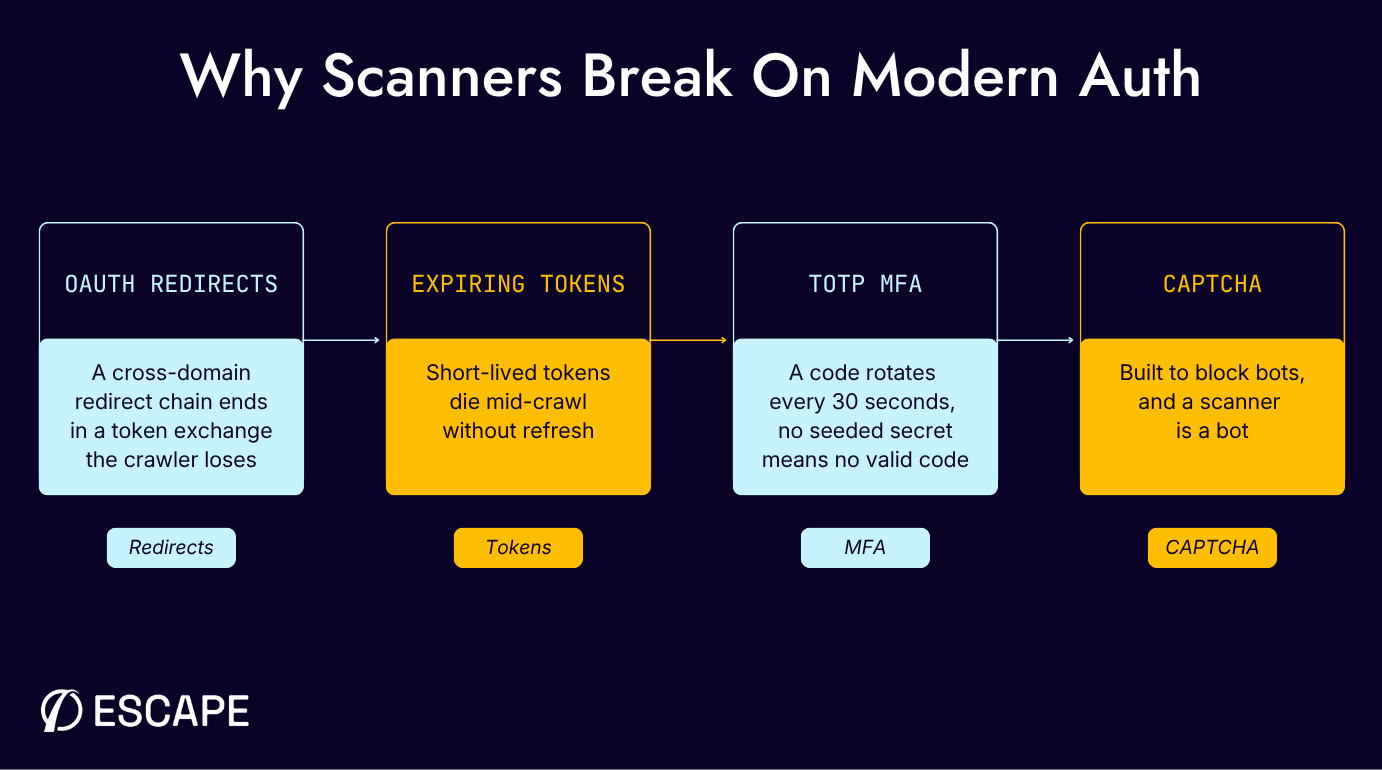
OAuth, MFA, and CAPTCHA each trip a scanner in a different place, which is why the single "log in with these credentials" setting most tools ship with rarely survives contact with a real application. Treat them as one problem, and you'll keep missing at least one.
OAuth and MFA move faster than a crawler
OAuth breaks crawlers on structure. The authorization code flow defined in RFC 6749 sends the user agent through a series of redirects, often across domains, hands back an authorization code, then exchanges that code for an access token in a separate back-channel request. Modern flows also layer PKCE (RFC 7636) on top, so a replay without the matching verifier dies at the token exchange.
An access token can expire in minutes. RFC 6749 pairs short-lived access tokens with refresh tokens, and a scanner that authenticates once and never refreshes watches its session expire mid-crawl.
A TOTP code lasts 30 seconds by default. RFC 6238 derives it from a shared secret and the current time step, and recommends that 30-second step. Without the secret, your scanner can't produce a valid code, and no retry logic changes the arithmetic.
OWASP treats this as something you have to actively handle. Its WSTG-ATHN-11 asks you to identify the MFA type, judge whether the implementation is robust, and try to bypass it, and all three assume you can already reach the surface behind it.
CAPTCHA and the session hygiene traps
CAPTCHA is a wall on purpose. It exists to block automated traffic, and your scanner is automated traffic, so the conflict is architectural, not a fault in your tooling. Defeating it in production is usually the wrong instinct and the wrong permission set, so the honest fix lives in the environment.
A crawler that follows every link it finds will eventually hit the logout link, end its own session, and spend the rest of the run anonymous. It's self-inflicted and easy to miss, because nothing in the report flags it.
Some applications only behave correctly under a single-threaded session. Aggressive parallel requests can corrupt session state, trip rate limits, or invalidate tokens mid-flight, and coverage degrades with nothing in the log to flag it. It looks like flaky results, so nobody checks the session.
How to get real coverage, and keep it every build
The methodology below is tool-neutral. Most automated pentesting scanners expose some of these settings, but few hold all of them under real auth for the length of a run. Escape proved this on a hard case with Applied Systems, a login that required single-threaded authenticated scanning with a CAPTCHA blocking the scanner.
Escape built the custom authentication during the proof of concept and cleared the CAPTCHA blocker in about half a day, so the scan reached the surface behind the auth.
Hold the session, then prove you did
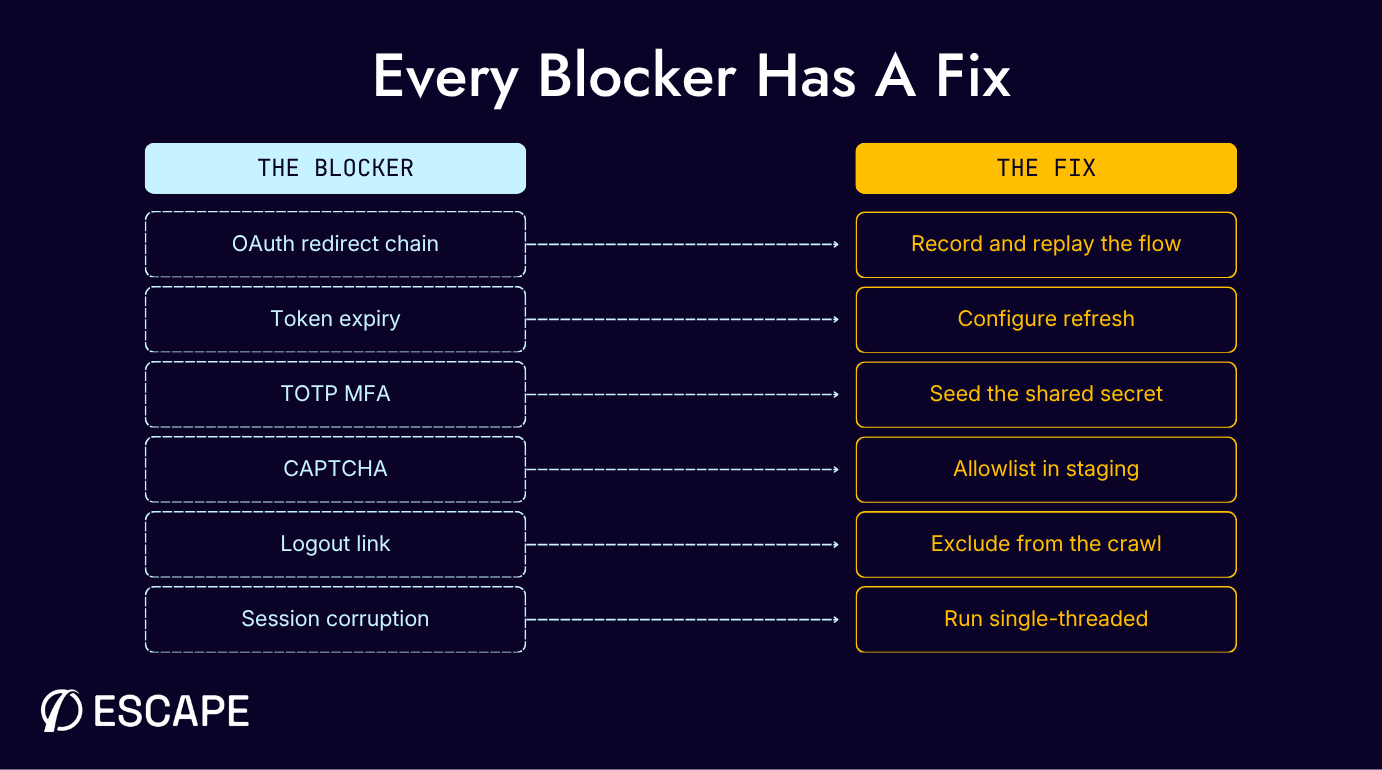
For OAuth and SSO, record the full authorization code flow and replay it, redirects and token exchange included, not a pasted bearer token. Then configure refresh so the session survives token expiry. Escape's authentication documentation covers this end-to-end, including advanced workflows for multi-step logins.
For MFA, seed the scanner with the TOTP shared secret so it computes the current code like an authenticator app. That's a configuration step, not a bypass, and it's what gets the scanner to the MFA surface at all. Keep the secret in your secrets manager with every other test credential.
For CAPTCHA, the reliable method is to allowlist the scanner's traffic or disable the challenge in test and staging. Automated solving can help in constrained cases, but treating it as the primary plan is how teams end up with intermittent, unexplained coverage gaps.
Session hygiene is where most remaining coverage leaks. Exclude the logout route, set a re-authentication trigger so the scanner logs back in on a dropped session, and run single-threaded where the app requires it. Each is a few lines of config, and each saves a whole run.
Prove it by validating every authenticated scan against screenshots or an exploration graph of the endpoints the scan actually reached, and treat that evidence as part of the result.
What holding the session actually catches
Holding a session is worth the setup because the highest-severity modern risks are only reachable once you're inside. OWASP's API Security Top 10 puts Broken Object Level Authorization and Broken Authentication in the top two spots, with Broken Function Level Authorization, the classic privilege escalation to an admin-only function, at API5.
None of those authorization failures can be tested by an anonymous crawl. BOLA needs two valid identities, because the question is whether one user can gain access to another user's object, the unauthorized access an outside scan never sees.
Escape re-authenticates automatically when a session expires, so coverage stays authenticated for the whole run, and multi-identity testing is the other half. Escape's AI pentesting engine, Cascade, tests as multiple users at once in separate authenticated sessions.
When Cascade proves a finding, it ships the request chain, the user scopes involved, and a working exploit, and AI DAST converts that into a regression test that re-runs on every build, so complex-auth coverage runs per release rather than once a year.
Escape's DAST backs that up with built-in OAuth presets (authorization code, client, and ROPC), TOTP-based MFA, and multi-step workflows for logins that don't fit a preset. For CAPTCHA, Escape solves simple text-based challenges with AI and falls back to allowlisting the scanner for advanced systems like reCAPTCHA or hCaptcha in test and staging.
A session configuration that works today can break when an auth library or SSO tenant changes, and you want to hear about that from a failing scan on Tuesday, not a report six months later. Escape reports 63% more complex true positives, and fewer false positives, than legacy DAST, and findings at that depth are the ones that move your security posture.
Conclusion
A passing scan tells you nothing if the scanner never got behind the login. Authenticated vulnerability scanning is something you set up deliberately and then verify, replaying the OAuth flow, seeding the TOTP secret, allowlisting CAPTCHA in staging, and confirming the run actually reached your authenticated endpoints.
Do that and a green report means something again. Holding that session for a whole run and re-testing it on every build is what Escape is built to do. Its DAST ships OAuth, TOTP, and multi-step auth presets, and AI Pentesting tests as several users at once to reach the BOLA and access-control flaws a single session can't. Applied Systems handed Escape a login that had stopped every other scanner, and it cleared the blocker in about half a day. Book a demo and point Escape at your hardest login.
FAQs
What is authenticated vulnerability scanning?
Authenticated vulnerability scanning, also called credentialed or gray-box scanning, runs with a valid logged-in session so it tests what a real user reaches: the account APIs, billing flows, and admin functionality an anonymous scan never sees. That's where the sensitive data and the real risk live.
Can a vulnerability scanner get past MFA and CAPTCHA?
Yes, both are configuration problems rather than dead ends. For MFA, hand the scanner the TOTP shared secret from your secrets manager so it derives each code like an authenticator app, and check your account lockout policy first, because repeated automated logins can trip it. For CAPTCHA, the dependable route is allowlisting the scanner or turning the challenge off in test and staging. Automated solving is a fallback, not the primary plan, and never in production.
Why did my scan pass but miss vulnerabilities behind login?
The usual cause is silent degradation, where your scanner hit OAuth, MFA, or CAPTCHA, failed to authenticate, and carried on as an anonymous user, so it only tested the login page. Open the request log and look for 302s redirecting back to the login page partway through the run, the clearest tell that the session dropped. If no authenticated endpoint appears at all, the session never existed.
How do you conduct an authenticated scan?
Conducting authenticated scans starts with valid credentials for the target system, ideally a dedicated test user account with the privileged access the scan needs. Give the scanner the credentials provided, configure how it holds the session (OAuth replay, a seeded TOTP secret, re-auth triggers), and point the scanning process at the surface behind the login. Then confirm it reached the elevated, role-gated areas and returned actionable results, not just an accurate-looking green summary.
What's the difference between credentialed scans and non-credentialed scans?
These are the two methods most vulnerability assessment programs run. Non-credentialed scans probe the target the way external attackers and external threats do, finding open ports, exposed web servers, and other potential vulnerabilities from the outside. Credentialed scans, often run as internal scans, log in and inspect installed software, weak passwords, internal configurations, and the internal vulnerabilities and security weaknesses outsiders can't see. Combining authenticated and non-credentialed scans gives the complete picture, which is what authenticated scans provide that an outside-in scan can't.
How do authenticated scans fit vulnerability management and compliance requirements?
Authenticated scanning is an ongoing process, not a one-off. Because it reaches the internal systems where real security risks live, it feeds vulnerability management and risk analysis with detailed information for an accurate assessment, so teams can prioritize remediation efforts on what matters. It supports compliance requirements too, since PCI DSS and similar regulatory frameworks expect scanning that reaches the authenticated surface, and other regulatory standards are moving the same way. Running it on every build keeps your security posture honest as new vulnerabilities appear.
Sources
- SP 800-115, Technical Guide to Information Security Testing and Assessment - NIST (National Institute of Standards and Technology)
- 2026 Data Breach Investigations Report - Verizon Business
- RFC 6749, The OAuth 2.0 Authorization Framework - IETF (Internet Engineering Task Force)
- RFC 6238, TOTP: Time-Based One-Time Password Algorithm - IETF (Internet Engineering Task Force)
- Web Security Testing Guide, Testing Multi-Factor Authentication (WSTG-ATHN-11) - OWASP Foundation
- API Security Top 10 2023 - OWASP Foundation