DAST Tools: Complete Buyer's Guide & Top 10 Solutions in 2026
Compare the best DAST tools in 2026. Our quick buyer's guide covers 10 dynamic application security testing solutions, key features, pricing & how to choose the right one.

I've spent the past two years talking to AppSec engineers about their DAST tools experience. Some conversations lasted five minutes. Others turned into hour-long sessions on the podcast or elsewhere about false positives and broken authentication flows.
And then April 2026 happened. Anthropic's Claude Mythos model was released and found thousands of vulnerabilities in operating systems, browsers, and cryptography libraries. And the security industry collectively shared a lot of reactions, both positive and negative. OpenAI responded within a week with GPT-5.4-Cyber. AI pentesting startups collectively raised hundreds of millions. CrowdStrike's 2026 Global Threat Report documented a 29-minute average eCrime breakout time, 65% faster than 2024, with an 89% year-over-year surge in AI-augmented attacks.
The security world is moving faster than it ever has. And in the middle of this whirlwind, a simple question keeps coming up: where do DAST tools fit in a world where AI can find and exploit vulnerabilities at machine speed?
Legacy DAST scanners were built for a different era — one where applications were server-rendered monoliths, APIs were an afterthought, and security teams had the luxury of running a weekly scan and calling it a day. That era is over. Applications today are API-first, built on React or Next.js frontends, powered by GraphQL or REST backends, deployed multiple times a day through CI/CD pipelines, and increasingly written by AI coding assistants pushing code at velocities no human security team can manually review.
And yet, many organizations are still running the same dynamic application security testing tools they adopted five years ago. Tools that do not support single-page applications or CAPTCHA embedded in the auth, find mainly headers instead of BOLA or IDOR, and produce findings so full of noise that developers stopped reading them months ago. Meanwhile, the best modern DAST platforms are evolving into something fundamentally different, combining continuous testing for simple vulnerabilities with AI pentesting that chains vulnerabilities into real attack paths.
This guide should be a helpful resource to evaluating DAST vendors, about what works when , what doesn't, and what you should actually look for when you're choosing a dynamic code scanning tool for your team.
Whether you're replacing a legacy DAST scanner, building your AppSec program from scratch, or just trying to figure out why your current tool keeps missing the vulnerabilities your pentesters find, this is for you.
Why most AppSec teams are frustrated with their current DAST tools
Let me be direct: the frustrations with DAST are real, and they're valid. From my conversations with dozens of AppSec engineers over the past years, the same pain points keep surfacing.
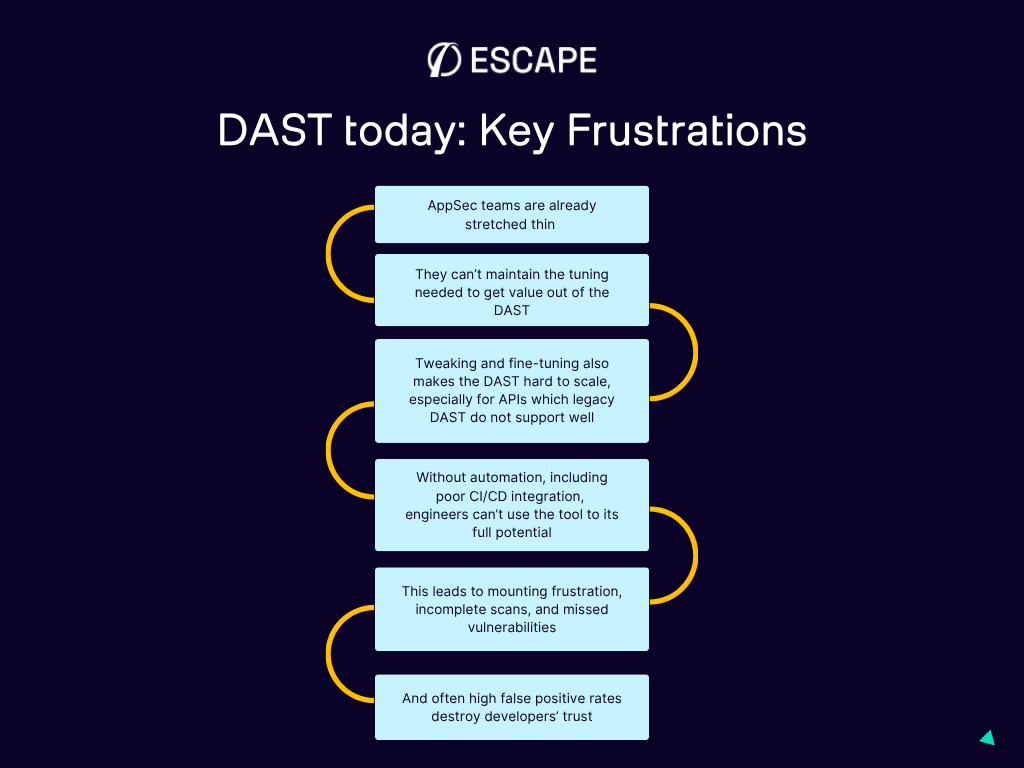
Too much configuration, not enough value
This came up in nearly every conversation I've had. If you've ever worked with a legacy DAST scanner, you've probably felt it — the exhausting amount of setup required before the tool produces anything useful.
One Staff Security Engineer at Box captured it perfectly: the time that can be allocated by engineers on DAST is simply not enough to tune it to a state where it delivers consistently reliable results. And when you're a security team of one person supporting 50 or 100 developers, that configuration burden becomes untenable.
Fine-tuning scan parameters, uploading API specs manually, configuring authentication flows step by step, setting up target scopes — all of this takes hours before you even get your first result. Hours that most teams don't have.
False positives that destroy developer trust
Here's the cascade that kills a DAST deployment: the tool generates hundreds of findings. Developers review the first batch and find that a large portion are theoretical, duplicated, or impossible to reproduce. After a few cycles of this, developers stop trusting the tool. Security tickets from DAST get deprioritized or ignored entirely. And now you've got a DAST tool that's technically running but delivering zero practical value.
The number of findings is far less important than their reliability. A tool that surfaces ten confirmed, exploitable vulnerabilities with clear evidence provides infinitely more value than one that dumps hundreds of maybes into your ticketing system.
No real API testing
APIs now represent the largest portion of the application attack surface for most organizations. Yet many legacy DAST tools were built for traditional HTML-based web applications. They can crawl pages, fill out forms, and click buttons. But ask them to test a GraphQL mutation for broken object-level authorization? They don't even know where to start.
API security testing can be ensured by a combination of methods and there are raising questions about new AI cyber models being able to test without the need to testing for runtime vulnerabilities. What Mythos is not is a DAST tool. It doesn't test running applications for business logic flaws. It doesn't check whether User A can access User B's data through a sequence of authenticated API calls. These runtime behaviors (the ones that modern DAST exists to catch) don't show up in source code analysis.
Poor CI/CD integration
If your DAST tool can't run automatically in your pipeline, it becomes a bottleneck that teams work around rather than through. Legacy scanners that take 12 hours per scan simply don't fit into modern development workflows where code ships multiple times a day. And even tools that technically offer CI/CD integration often provide a bare-bones CLI that requires significant custom scripting to work properly.
What to actually look for in a DAST tool (a practical framework)
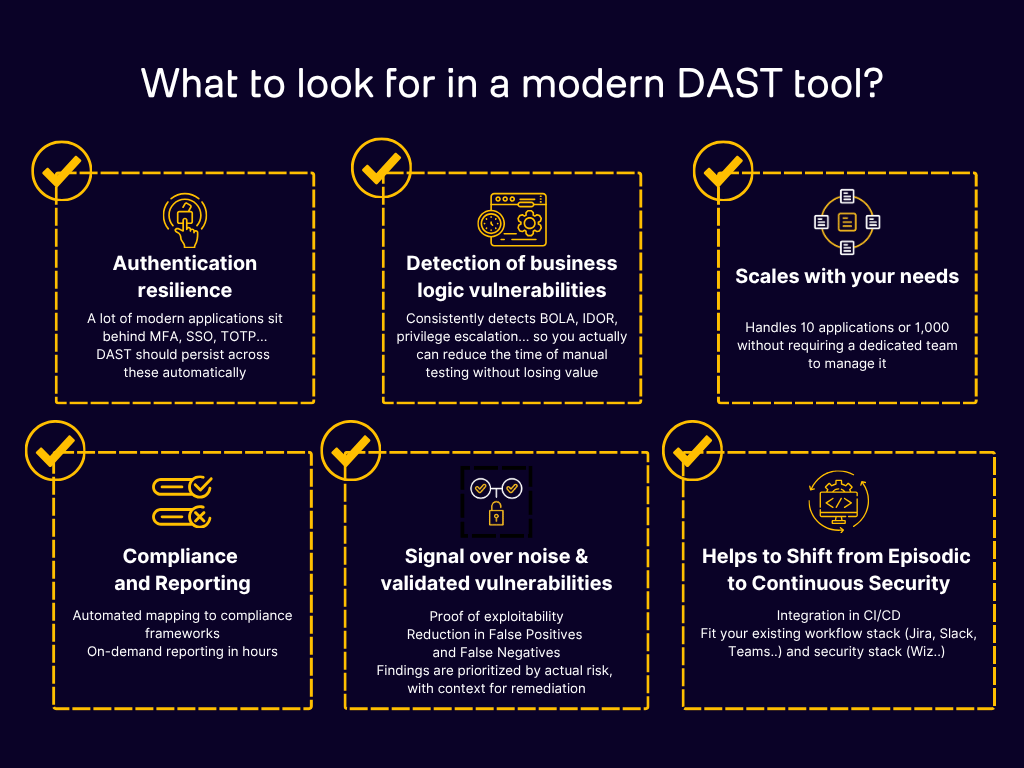
Feature lists from most DAST vendors all look the same. Every tool claims API scanning, CI/CD integration, authentication support, and comprehensive vulnerability coverage. The differences only become apparent when you test them against real applications according to the success criteria you've built for POCs.
Here are the ten criteria that actually separate good DAST tools from the rest:
1. Business logic vulnerability detection
It's 2026. This is the dividing line between modern and legacy DAST. Can the tool detect BOLA (Broken Object Level Authorization), IDOR (Insecure Direct Object References), and access control flaws? These are the vulnerabilities attackers actually exploit in production, and they require the scanner to understand multi-user workflows and permission boundaries. Tools that only test for the OWASP Top 10 basics miss what matters most. If you want to go deeper on the business logic vulnerability detection, you can also try AI pentesting tools.
2. False positive rate
Ask every vendor you evaluate for their documented false positive rate. Tools with proof-based scanning, where findings are validated as actually exploitable before being reported, waste dramatically less of your team's time. Industry leaders like Escape or Bright Security achieve under 5%. If a vendor can't explain how they've calculated their false positive rate, that's a red flag.
3. API protocol support
Your DAST tool needs to natively understand REST, GraphQL, gRPC , not just wrap HTTP-level payloads around API calls. Native support means the tool understands protocol-specific vulnerabilities. For GraphQL, that means schema introspection, nested resolver authorization testing, and batching attack detection. For REST, it means actually understanding your API's data model.
4. CI/CD integration depth
There's a difference between "we have a CLI" and "we natively integrate with your pipeline." Check for pre-built integrations with GitHub Actions, GitLab CI, Jenkins, and Azure DevOps. Can the tool run incremental scans? Can it test only a portion of your application that has been changed by developer? Can it fail builds based on severity thresholds? Does it provide actionable output that developers can act on directly?
5. Authentication handling
Modern applications use complex auth flows — OAuth 2.0, SAML, SSO, MFA, JWT refresh and rotation. If your DAST scanner can't maintain session state through these flows, it's testing only the unauthenticated surface of your application.
6. Remediation guidance quality
Finding vulnerabilities is half the challenge. The other half is giving developers the information they need to fix them. Generic remediation advice like "use input validation" is useless. The best DAST tools provide stack-specific code fixes, tailored to whether you're running Django, Spring Boot, Express, or React. They provide exploit proof and screenshots of what portion of the application has been covered during crawling, so your developers trust the input.
7. Scan speed and scalability
A tool that works well for 10 applications may fall apart at 100 or 1,000. And if a single scan takes hours, it won't survive in a CI/CD environment. Check scan parallelization capabilities and how the tool handles enterprise-scale deployments.
8. API and asset discovery
You can't secure what you can't see. Does the tool automatically discover your APIs and web applications, including shadow APIs that aren't documented? Agentless discovery reduces manual inventory maintenance and catches the endpoints your team forgot about.
9. Compliance reporting
If you operate in a regulated industry, you need audit-ready outputs. Look for pre-built templates covering PCI DSS, SOC 2, HIPAA, ISO 27001, GDPR, and DORA. With DORA now in effect for EU financial services, automated DAST has moved from "nice to have" to a regulatory expectation.
10. Total cost of ownership
Licensing fees are just the beginning. Factor in implementation time, training requirements, ongoing maintenance, and integration development. Some tools require weeks of professional services to deploy. Others are running scans within an hour.
The 10 DAST tools you need to know in 2026
Here's where we get specific. We've evaluated these tools based on real-world performance, conversations with security teams who use them, independent reviews, and hands-on testing. But it's clear that the best DAST tool for your team depends on your architecture, workflows, and priorities.
| DAST Tool | G2 Rating | Best For | API Support | CI/CD Integration | Pricing Model |
|---|---|---|---|---|---|
| Escape | 4.8/5 | Modern AppSec teams working with APIs and SPAs, including support for complex authentication and business logic testing | REST, GraphQL, SOAP (external scans) | Native integrations with GitHub, GitLab, and Jenkins | Per application / Enterprise |
| StackHawk | 4.5/5 | Developer-first DevSecOps teams | REST, GraphQL, SOAP, gRPC (limited API security detection, built around ZAP) | Excellent | Per application, with free tier |
| Invicti | 4.6/5 | Enterprise security teams that need audit-ready reporting | REST, SOAP, GraphQL (limited) | Available, but can be harder to implement and offers limited debugging detail | Per seat / Enterprise |
| Bright Security | 4.4/5 | Mid-sized teams with more predefined application environments | REST, SOAP, GraphQL (limited) | Yes | Per scan |
| Snyk (Probely) | 4.3/5 | Teams already operating inside the Snyk ecosystem | REST (manual upload) | Basic | Per target |
| Burp | 4.7/5 | Pentesters and hands-on security testers | REST, limited API support | Basic | Per seat, with free community edition |
| Intruder | 4.5/5 | SMBs looking for a simpler vulnerability scanning setup | REST | Yes | Flat-rate tiers |
| Checkmarx | 4.2/5 | Enterprises looking for combined SAST and DAST capabilities | REST, SOAP, gRPC | Yes | Enterprise custom pricing |
| Fortify WebInspect | 4.1/5 | Regulated industries that prioritize reporting | REST, SOAP, GraphQL, gRPC (limited, with no business logic support) | Limited | Enterprise custom pricing |
| Detectify | 4.3/5 | Small to mid-sized businesses that want fast, lightweight vulnerability scanning without complex auth or business logic testing | Web apps only | Basic | Per domain |
Now let's dig into top five among them.
1. Escape
Best for: Modern AppSec teams securing APIs and SPAs, with strong needs around business logic testing and CI/CD automation.
Escape DAST was built from scratch for APIs, it wasn't adapted from an HTML crawler, which is what differentiates it from most of the market. The platform reads your OpenAPI spec or GraphQL schema (or crawls automatically if you don't have one), then generates intelligent attack payloads that test authorization boundaries, not just injection patterns.
What stands out:
- Proprietary Business Logic Security Testing algorithm that detects BOLA, IDOR, SSRF, and access control flaws — the vulnerabilities that traditional DAST scanners miss entirely
- Native GraphQL support including schema introspection, nested resolver authorization testing, and batching attack detection
- AI-powered authentication handling (OAuth 2.0, AWS Cognito, JWT rotation, MFA) that eliminates one of the biggest DAST pain points
- Automatic API discovery and schema generation — no manual spec uploads required
- Stack-specific remediation code snippets tailored to your framework (Django, Spring Boot, React, etc.) with visual exploit proof (screenshots, exploration graphs) so engineers see how something is vulnerable, not just that it is
- Integration with Wiz for unified risk visibility across code and cloud
- SPA testing now available, making it a comprehensive solution for modern web apps
- Can be complemented by Agentic AI pentesting that builds on the DAST knowledge graph to chain vulnerabilities into multi-step attack scenarios — bridging the gap between automated scanning and manual pentests. In this case, every vulnerability found (by Escape, bug bounty, or manual pentest) becomes a permanent regression test in CI/CD
Limitations: The number of external integrations is still growing (though core ones — GitHub, GitLab, Jenkins, Jira, Slack — are covered). Advanced features have a learning curve, though the team has invested heavily in onboarding support. Agentic pentesting complimenting DAST is newer and still expanding its coverage of complex multi-step chains.
What teams say: One senior security architect reported having their entire API attack surface scanned within about an hour. A manufacturing company reduced manual triage time by over 1,000 engineering hours annually after switching to Escape from a legacy DAST tool. Nick Semyonov, PandaDoc's Director of IT & Security noted: "Our developers are a lot more productive, but we're pushing twice as much code into production. My team is not three times the size" — Escape's continuous approach solved the coverage gap.
2. StackHawk
Best for: Developer-centric teams that want DAST integrated directly into their CI/CD pipeline with minimal friction.
StackHawk was built with developers in mind, and it shows. The tool is designed to run as part of every PR and build, providing quick feedback on common vulnerabilities. It's built on top of ZAP (the open-source DAST engine) but wraps it in a much more developer-friendly experience.
What stands out:
- Excellent CI/CD integration — feels native in most pipeline configurations
- Supports REST, GraphQL, SOAP, and gRPC
- Free tier available for getting started
- Fast scan times suited for pipeline integration
- Good documentation and developer experience
Limitations: Business logic vulnerability detection is limited. Because it's built on ZAP, the underlying detection engine has the same constraints as the open-source tool. API security depth is more surface-level compared to purpose-built API security solutions. Remediation guidance is more generic.
3. Bright Security
Best for: Mid-sized teams looking for a developer-friendly DAST with IDE integration and reasonable pricing.
Bright Security focuses on validated vulnerability detection and developer experience. The platform emphasizes finding confirmed, exploitable vulnerabilities rather than generating high-volume reports.
What stands out:
- Validation-first approach reduces false positives
- IDE integration for early-stage testing
- Support for major CI/CD platforms
- Per-scan pricing can be cost-effective for smaller portfolios
Limitations: Requires manual API schema uploads — no automatic API discovery. Limited authentication support for complex flows. GraphQL coverage is basic. Smaller team and community compared to larger vendors, which can affect support responsiveness and feature velocity.
4. Invicti (formerly Netsparker DAST)
Best for: Enterprise security teams that need comprehensive compliance reporting alongside dynamic scanning.
Invicti has been in the DAST market for a long time, and it shows in the maturity of its reporting and enterprise features. The tool offers proof-based scanning that validates findings, reducing false positives. Its compliance reporting capabilities make it particularly attractive for regulated industries.
What stands out:
- Proof-based scanning reduces false positives significantly
- Mature compliance reporting (PCI DSS, SOC 2, HIPAA, ISO 27001)
- Strong REST and SOAP API coverage
- ASPM capabilities for broader application security posture management
- Well-established enterprise deployment patterns
Limitations: GraphQL support remains basic compared to purpose-built tools. CI/CD integration exists but isn't always straightforward to implement and can lack detailed debugging information. Higher price point that may not suit smaller teams. Business logic testing capabilities and support for complex auth are limited according to former users.
5. Burp Suite DAST
Best for: Security researchers, pentesters, and teams with strong manual testing capabilities.
Burp Suite is the gold standard for manual web application security testing, and the Enterprise edition brings some of that power into an automated context. If your team has experienced pentesters who know their way around Burp, the enterprise version gives them scalability.
What stands out:
- Extremely deep scanning engine for web application vulnerabilities
- Extensive extension ecosystem (BApp Store)
- Strong community and knowledge base
- Excellent for manual + automated hybrid approaches
Limitations: API support is limited — this is fundamentally a web application testing tool. CI/CD integration is basic. The learning curve is steep for non-security professionals. It's not built for developer self-service. Scaling across large application portfolios requires significant operational overhead.
Honorable mention: OWASP ZAP
If budget is a primary constraint, OWASP ZAP remains the best open-source DAST option available. It's free, extensible, and has an active community. But be realistic about what it requires: significant expertise to configure properly, manual setup for most testing scenarios, and no commercial support. For teams building security programs incrementally, ZAP is a reasonable starting point — but plan for the engineering time it demands.
SAST vs. DAST: you need both, but for different reasons
Do we still need DAST if we already have SAST?
Yes. They answer fundamentally different questions.
SAST (static application security testing) analyzes your source code without running the application. It's excellent at finding code-level issues like SQL injection patterns, hardcoded secrets, and unsafe functions. SAST catches problems early in development, before the code is even deployed.
DAST (dynamic application security testing) tests the running application. It finds runtime vulnerabilities that only emerge when the application processes real requests — broken access controls, authentication bypass, business logic flaws, and issues that arise from the interaction between multiple services.
Here's a concrete example: SAST might look at your authorization middleware and confirm that the code correctly checks user roles. But DAST might discover that when a specific sequence of API calls is made, the authorization check is bypassed because of how the middleware interacts with your caching layer. The code is "correct" — but the behavior is vulnerable.
The most effective application security programs use SAST and DAST together, along with SCA for supply chain security. Each layer catches what the others miss. The combination is greater than the sum of its parts.
How to evaluate DAST tools without wasting months
Vendor evaluations can drag on forever if you don't structure them. Here's the approach I've seen work best, based on conversations with teams who've gone through this process successfully.
Set a 4-6 week timeline and stick to it
An open-ended evaluation will expand to fill all available time. Define your timeline upfront, commit to 2-3 finalist tools, and plan your testing around 1-5 critical applications that represent your actual environment , not demo apps.
Define success criteria before you start
Decide what "better" means for your team before you see the first demo. Is it fewer false positives? Faster scan times? Better API coverage? Business logic detection? CI/CD integration? Write it down, assign priorities, and use it as your evaluation rubric.
Some criteria that consistently matter:
- False positive rate — does it offer meaningful improvement over legacy tools?
- Scan time — can it run within your deployment window?
- Authentication handling — can it navigate your actual login flow without manual configuration?
- Coverage depth — does it find vulnerabilities your current tool misses?
- Developer experience — will your engineering team actually use the remediation guidance?
Run against real applications, not demo targets
Lots of DAST tools look impressive when pointed at DVWA or a deliberately vulnerable demo app. The real test is how it handles your actual production architecture — your authentication flows, your API endpoints, your SPA frontend, your microservice interactions.
Compare results from the new tool against your legacy scanner side by side. Track what each one finds, what it misses, and how long it takes.
Measure tangible improvements
After the pilot, collect the data that supports your business case:
- Scan time improvement (e.g., from 12 hours to 45 minutes)
- Critical vulnerabilities found that the legacy tool missed
- False positive rate reduction (e.g., from 45% to under 10%)
- Developer time saved on triage and remediation
- Integration effort required
These numbers are what get executive buy-in for the switch.
The Mythos effect: what AI vulnerability discovery means for DAST
The Mythos news I mentioned at the top of this article has dominated every security conversation for the past two weeks. But beyond the headlines, the practical implications for DAST buyers are more nuanced than most coverage suggests.
What Mythos does and what it can't
Mythos is a code-level vulnerability discovery and exploitation engine. It reads source code, hypothesizes about weaknesses, writes proof-of-concept exploits, and validates them — at machine speed across enormous codebases. It's extraordinary at what it does.
What Mythos doesn't do is test running applications for business logic flaws. It doesn't check, for example, if Company A’s sales reps can’t access Company B’s customer data, even though both have identical "Sales Rep" permissions or verify that portfolio managers can’t access compliance officer audit trails and vice versa (discover how to set multi-user testing up with Escape). These runtime behaviors (the ones that DAST exists to catch) don't appear in source code, no matter how sophisticated the model analyzing it.
Mythos operates on code. DAST operates on running systems. They're complementary, not competitive.
The patch tsunami is coming and your app layer still needs coverage
Anthropic assembled Project Glasswing, a 12-partner coalition including CrowdStrike, Cisco, Palo Alto Networks, Microsoft, and AWS, to run Mythos against their own infrastructure.
That means a massive wave of infrastructure patches is coming. Your team will need to prioritize and deploy them at speed. And in the meantime, your custom applications (the API logic, the authentication flows, the business rules) still need runtime testing that no source code model can fully replace.
Where AI pentesting fits (and doesn't replace DAST)
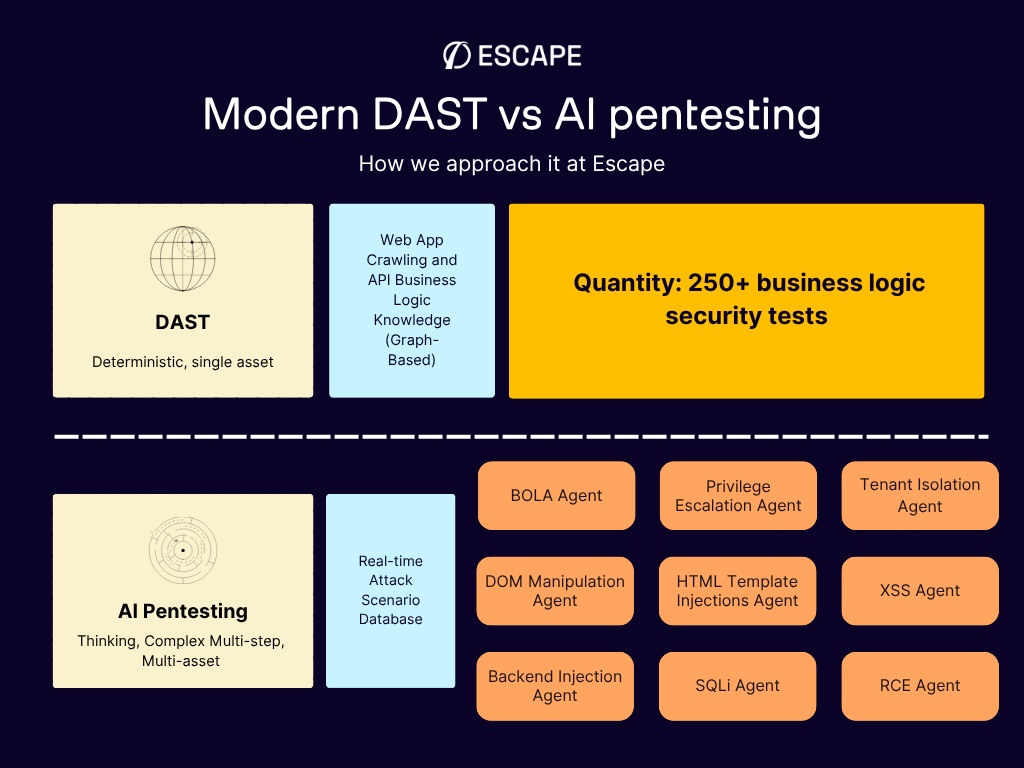
2026 has also accelerated the AI pentesting market. This is real progress - agentic AI systems that chain multiple vulnerabilities into multi-step attack paths, simulating how a real attacker would move laterally through your environment.
But here's the distinction that matters when you're allocating budget:
DAST is your continuous security gate. It runs on every build, in every pipeline, testing individual endpoints and workflows for vulnerabilities like XSS, SQLi, BOLA, IDOR, and access control flaws. It's automated, fast, and designed to keep pace with CI/CD. You need it running on every code change.
AI pentesting is your more periodic deep-dive. It goes beyond single-vulnerability detection to chain weaknesses into realistic attack scenarios, discovering that a low-severity API endpoint, combined with a session handling flaw and a misconfigured permission, creates a path to full account takeover. It's the depth of a senior pentester, running at machine speed.
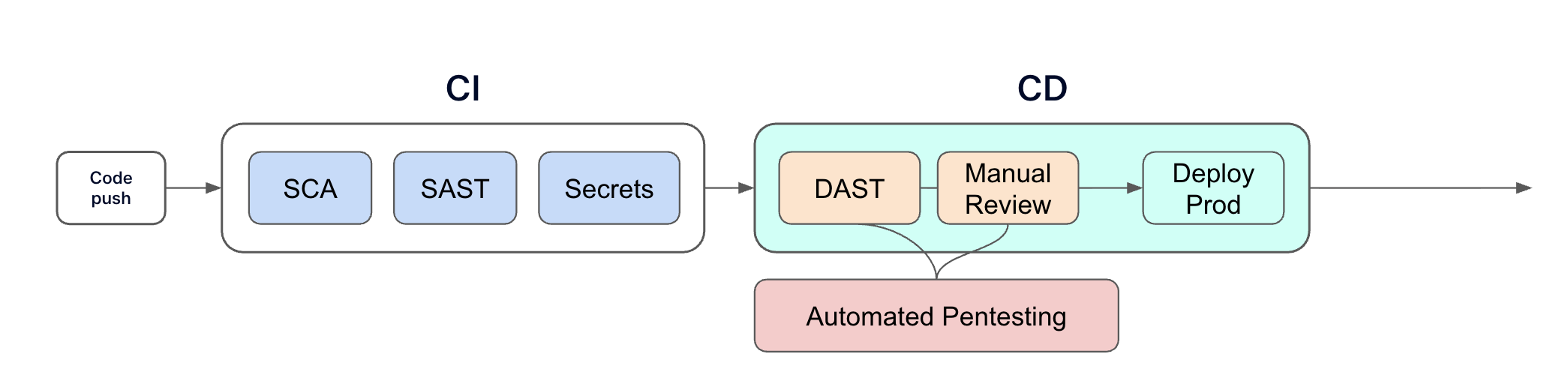
For now, there are not competing categories. They're different layers of the same security program. We'll see what the future brings...
AI-generated code is expanding your attack surface faster than ever
There's another dimension to the AI conversation that directly affects your DAST strategy: the code being written by AI assistants is creating new attack surfaces faster than most security teams can review.
When developers use tools like Copilot, Cursor, or Claude to generate code, they're producing more endpoints, more API routes, and more application logic per day than was possible two years ago. In our webinar last year, one of the clients put it blindly: "Now our developers are a lot more productive, but we're also pushing twice as much or three times as much code into production. My team is not three times the size."
This velocity creates a specific security problem. AI-generated code is often syntactically correct but semantically insecure. Developers review it for "does this do what I want?" — not "is this secure?" That creates risks SAST can't fully see: misunderstood auth flows, copy-pasted authorization logic applied incorrectly, endpoints developers don't realize they've exposed.
Escape's security research team recently uncovered more than 2,000 high-impact vulnerabilities in 5,600 publicly available "vibe-coded" applications — apps built rapidly with AI assistance. This included 175 instances of exposed personal data, often with multiple sensitive secrets revealed at once. Every vulnerability was in a live production system.
The math is straightforward: more code, more endpoints, more APIs — all shipping faster than ever — means you need automated runtime testing that keeps pace. Annual pentests and periodic DAST scans can't cover this velocity. You need DAST that runs on every build, in every pipeline, with automatic discovery of new endpoints as they appear.
This is arguably the strongest case for modern DAST in 2026. Not as a compliance checkbox, but as a continuous quality gate for application security in a world where AI is writing code at speeds that make manual review impossible.
The bottom line
The DAST market in 2026 isn't just splitting between legacy and modern. We're also seeing how it's converging with AI pentesting into something fundamentally new.
Legacy tools like Qualys DAST and its alternatives, Rapid7, and basic ZAP implementations will check your compliance box. But as one engineer I spoke with put it, they're of limited use beyond that. And in a world where Mythos just found thousands of infrastructure-level vulnerabilities at machine speed, "compliance checkbox" isn't a defensible security posture for your application layer.
Modern DAST tools — particularly those with native API security, business logic testing, and intelligent automation — deliver actual security value. They find the vulnerabilities that attackers exploit. They integrate into the workflows developers already use. They reduce the operational burden on security teams rather than adding to it.
But the most interesting shift is happening at the intersection of DAST and AI pentesting. The leading platforms are evolving from "scan for vulnerabilities" to "continuously discover, test, chain, and remediate", covering the full offensive security lifecycle. For example, Escape DAST provides the continuous runtime testing foundation. Escape AI pentesting adds the depth of multi-step attack chain discovery. Together, they give outnumbered security teams the coverage that used to require a headcount they'll never get.
The right tool for your organization depends on your architecture, your team, and your priorities. But the days of accepting a noisy, slow, configuration-heavy DAST scanner because "that's just how DAST works" are over. And the days of treating DAST and pentesting as completely separate line items may be numbered too.
And in the end, it's about how to make the security and engineering teams succeed. And the tools that understand that — the ones that combine continuous testing with intelligent offensive security — are the ones worth investing in.
FAQ
What is a DAST tool?
A DAST (dynamic application security testing) tool tests running applications for vulnerabilities by simulating real-world attacks from the outside. Unlike static analysis, DAST interacts with the live application to find runtime issues like broken authentication, access control flaws, and injection vulnerabilities.
What's the difference between DAST and SAST?
SAST analyzes source code without running the application, catching code-level vulnerabilities early. DAST tests the running application to find runtime behaviors and interaction-based vulnerabilities. The most effective security programs use both.
Can DAST replace penetration testing?
The relationship between DAST and pentesting is changing fast. Traditional DAST finds individual vulnerabilities; traditional pentesting chains them into attack scenarios. Today, AI pentesting platforms are automating much of what manual pentesters do — discovering multi-step attack paths at machine speed. The emerging model is DAST for continuous, per-build testing (your security gate) combined with AI pentesting for periodic deep-dive assessments (your offensive validation). Some platforms, like Escape, are converging both. Manual pentesting still adds value for novel attack research and creative exploitation, but it's no longer the only way to get depth.
How often should DAST scans run?
Most mature organizations run DAST scans automatically within CI/CD pipelines on every deployment or PR, with periodic deeper scans against staging and production environments. The goal is continuous testing that keeps pace with development speed.
What vulnerabilities can DAST tools detect?
DAST tools commonly identify SQL injection, cross-site scripting (XSS), broken authentication, access control flaws, server-side request forgery (SSRF), and security misconfigurations. Modern DAST tools additionally detect business logic vulnerabilities like BOLA, IDOR, and broken object property level authorization.
How do I choose the best DAST tool for my team?
Start by defining your requirements: API protocol support (REST, GraphQL, gRPC), CI/CD integration needs, authentication complexity, and false positive tolerance. Then run a structured 4-6 week pilot against your real applications — not demo targets. Compare results on detection accuracy, scan speed, developer experience, and total cost of ownership.
Are free DAST tools good enough?
Open-source tools like OWASP ZAP provide solid foundational scanning capabilities but require significant expertise and manual configuration. They're a reasonable starting point for teams building security programs, but most organizations outgrow them as their application portfolios and security requirements mature.
What's the difference between DAST and AI pentesting?
DAST and AI pentesting are complementary, not competing. DAST automatically tests running applications for individual vulnerabilities (XSS, SQLi, BOLA, IDOR) on every code change — it's continuous and integrated into CI/CD. AI pentesting goes further by chaining multiple vulnerabilities into multi-step attack paths, simulating how a real attacker would move through your system. Think of DAST as your continuous security gate and AI pentesting as periodic deep-dive offensive assessments. Modern platforms like Escape are combining both capabilities: business-logic-aware DAST for every build plus agentic pentesting that reasons about complex attack chains.
What does Mythos mean for my DAST strategy?
Anthropic's Mythos model finds vulnerabilities in source code at superhuman speed — but it doesn't test how your running application behaves. Your custom APIs, business logic, authentication flows, and access controls still need runtime testing. Mythos will trigger a massive patch wave for infrastructure software, but your application layer requires DAST for the same reason it always has: some vulnerabilities only surface when the code actually runs.
What is business logic testing in DAST?
Business logic testing goes beyond checking for common vulnerability patterns. It tests whether the application correctly enforces authorization rules, permission boundaries, and workflow constraints. For example, can User A access User B's data? Can a read-only user modify resources? These are the vulnerabilities attackers most commonly exploit, and they require the scanner to understand multi-user contexts.
💡 Want to discover more about DAST? Check out the following links:
- DAST is dead, why Business Logic Security Testing takes center stage
- We benchmarked DAST products, and this is what we learned
- The Elephant in AppSec Podcast⎥ Lack of effective DAST tools⎥ Aleksandr Krasnov (Meta, Thinkific, Dropbox)
- Reinventing API security: Why Escape is better than traditional DAST tools
- Escape DAST - Your Detectify Alternative